
Work from the actual site.
Import a supported site plan or permitted aerial image, check its scale and draw around the areas you need to irrigate. Keep planting, pipework and notes on organised layers.
TENSELO DESIGNER Apply for trial access
Turn a site plan into an irrigation layout you can check and quote.
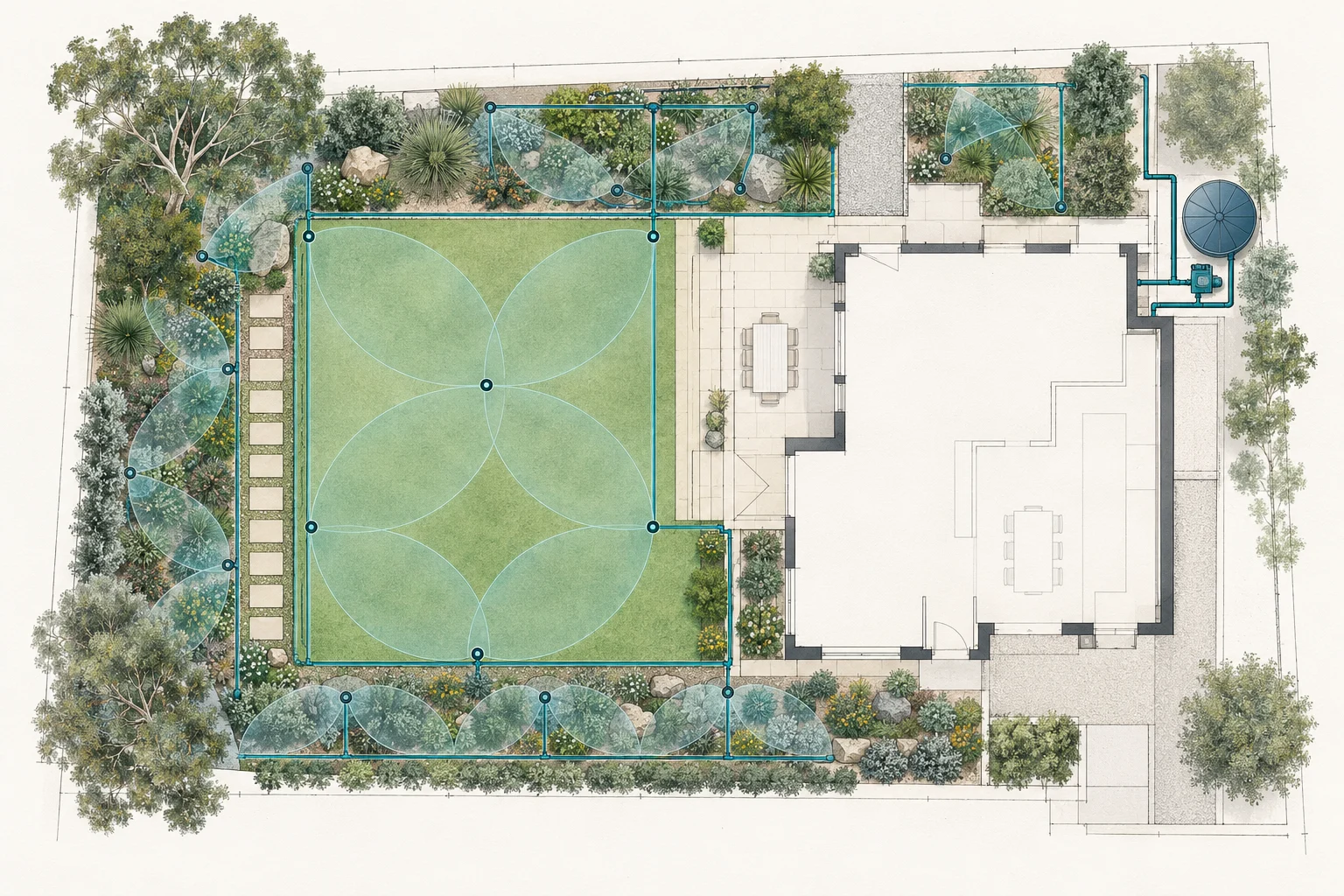
Lay out heads, valves, dripline and pipework to scale. Check flow and pressure on the connected design, then export a branded drawing and materials list for your customer or quoting team.
Works in your browser. No software download or installation needed. Included with Irrigation Basic and Irrigation Pro.
FOR IRRIGATION CONTRACTORS, LANDSCAPERS AND DESIGNERS
Keep the layout, equipment choices and quantities in the same job. When the design changes, rerun the checks and regenerate the drawing and materials list without starting a separate take-off from scratch.
Import a supported site plan or permitted aerial image, check its scale and draw around the areas you need to irrigate. Keep planting, pipework and notes on organised layers.
Connect your equipment and pipework, assign zones and run the supported hydraulic checks. Review flow, pressure and warnings before accepting a pipe size or equipment selection.
Prepare a drawing with scale, dimensions, legends and project details, then download a PDF and a materials schedule for discussion, quoting and review.
Design gardens, lawns and commercial landscapes in your browser. Keep the drawing, hydraulic checks and materials take-off together as the job changes.
What you need for a first test: Bring a site plan or aerial image, one known measurement if it is not georeferenced, and the available water pressure at a measured flow. Try a lawn and one garden bed first.
LANDSCAPE DESIGNER FEATURES AND BENEFITS
Work in a CAD-style browser workspace with drawing tools, layers, snapping and editable properties. Arrange the panels to suit how you work.
Use lines, areas, dimensions and supported imports to build your site plan. Check georeferencing or calibrate against a known distance so your measurements have a useful basis.
On eligible layouts, preview automatic head placement, check the throw and proposed positions, and adjust the layout before applying it. Use the selected nozzle and pressure data to review performance.
On eligible layouts, preview automatic pipe routes and choose what to apply. Size connected pipes and review zone flow, residual pressure and pump duty before you commit to the layout.
Plan drip runs and check supported connected layouts against the selected product evidence. Review inlet pressure, run lengths and separate filtration and flushing requirements.
Export a bill of materials with measured pipe lengths, selected irrigation equipment and supported planting quantities. Review unresolved fittings, allowances and supplier pack sizes before ordering.
Download scaled PDF sheets and materials exports. Save a complete Landscape project as a .tdl file, then reopen it with Landscape access. Include your logo and client details in the drawing setup.
TRY A PROJECT YOU KNOW
Start with a familiar garden. You will have a useful basis for comparing the layout, quantities and reported duties with your existing work.
Get Basic or Pro to trial ↗Check a site background, outline a lawn and garden bed, place a few heads and route a connected zone.
Enter your actual source conditions, run the supported checks and inspect warnings. Change a head or pipe choice and recalculate.
Export a scaled PDF and materials schedule. Check the drawing at actual print size and compare quantities with your own take-off.
CUSTOMER TESTIMONIALS
“I use Tenselo’s Landscape Designer every day. It’s simplified my work, and I can produce a full irrigation plan and bill of materials in about 10 minutes. That used to take me around two hours.”
INCLUDED IN YOUR IRRIGATION PACKAGE
Design gardens and landscape irrigation alongside the calculators in Irrigation Basic.
Work on landscape and agricultural projects alongside the calculators in Irrigation Pro.
Designer is included in these irrigation packages, with no extra Designer fee. Choose Irrigation and Basic or Pro when applying for a 14-day trial. Account approval is required. The Tenselo team enables the Designer workspace included in your plan. Monthly prices include GST. See the pricing page for current billing options.
Compare irrigation packages ↗INCLUDED WITH IRRIGATION BASIC & PRO
Start with a project you know and see how Tenselo fits your work.
Choose Irrigation and Basic or Pro in the trial application. No payment card is required.
Get Basic or Pro to trial ↗Applications require approval. Your trial starts on your first sign-in after approval. Tenselo enables the Designer workspace included in your plan.
Already have access? Sign in ↗No. You use Landscape Designer in your browser after sign-in and account enablement. You can download PDF drawings, materials schedules and a complete .tdl project file from the workspace. An enabled Landscape account is required to reopen the project file.
Yes, for supported connected layouts. Choose the available pipe material and class, set your criteria and review the sizing result. Locked selections, equipment data, source conditions and calculation warnings still need your attention.
You can import supported drawings, images and georeferenced files. Check the location and scale before drawing. Calibrate an ordinary image against a known distance, and use imagery only where your licence permits. Imported background linework does not become connected hydraulic pipework.
Yes. Place plant symbols, measure areas and enter the relevant density, depth, allowances or product details. Review plant counts, areas, fill volumes and purchase quantities in the materials workflow. Confirm prices, supplier packs and product suitability before ordering.
Landscape Designer is included with Irrigation Basic at A$69/month and Irrigation Pro at A$149/month, including GST, with no extra Designer fee. Choose Irrigation and Basic or Pro in your 14-day trial application. Account approval is required; Tenselo enables the Designer workspace included in your plan.
Catalogue coverage depends on the exact supported products and available performance data. The saved landscape hydraulic workflow checks supported branching layouts one zone at a time. It does not certify looped or multiple-source systems, water hammer, site suitability or an installation.
Get an Irrigation Pro trial to explore Agricultural Designer as well. Tenselo enables the Agricultural workspace on your approved account. It provides farm layouts, field planning and supported agricultural hydraulic checks. Read the Agricultural Designer page for its capabilities and limits.
KEEP EXPLORING
Use these guides alongside the Designer checks and your site and product information.
Explore Agricultural Designer for field layouts, drip, pivots and farm pipework.
Read the irrigation pipe sizing guide and irrigation pump sizing guide.
Explore our Tenselo irrigation design workflow for drawing, supported checks and customer handover.